
# Documentation
# Overview
Docgility can be easily installed in less than an hour. Docgility installs into any kubernetes environment with a simple installation script. Kubernetes is supported in most on premise cluster environments as well as private cloud environments.
# Description of Architecture
Docgility installation consists of installing data and compute (including backend and frontend components) resources. This describes the different components that are installed as part of a typical installation.
# Installation
Docgility can be easily installed in less than an hour. Docgility installs into any kubernetes environment with a simple installation script. Kubernetes is supported in most on premise cluster environments as well as private cloud environments.
The installation script allows enterprises to be up and running quickly, while allowsing backend integration to managed services for data services (and associated data backup services)
# Configuration
Configuration of the Docgility instance is very simple and customizable for your environment. It includes options to specify:
- Instance Name - This is the internal name for the Docgility application.
- SSO Settings - This provides simple logn and authentication integration to your existing single sign-on environment.
- Email Settings - This integrates with your internal email settings for outbound emails for alerts and notificatons.
- GenAI/LLM Integrations - This provides options for integrating prompts and calls to the GenAI/LLM environment of your choice, including support of Agentic AI resources.
- Integration to Docgility VCN - This allows for seamless real-time collaboration and negotiation with extenral entities.
- Runtime Performance Tuning Parameters - This enables onsite tuning of the performance characteristics of the application, enabling optimization for your runtime environment.
# Integrations
Docgility provides an integration interface to easily configure methods to bring external data sources into the application as options for users. For example, integrations may include:
- GenAI/LLM Integration - You can configure the application to call external GenAI interfaces with associated prompts to provide recommendations and other GenAI outputs to the application.
- External Data Sources - You can configure the application to access external data sources like NetDocuments and other document repository resources to bring in documents and other links as needed.
- Legacy Systems - You can configure the application to call external legacy systems to bring in records that may be important when reviewing a contract.
Integrations are available as preset integrations or custom integrations that are described via the interface provided. All integrations are available through standard API calls to external systems.
Keep in mind that integrations are configured for the application and require external calls. It is important to ensure that the interfaces are highly secure to guarantee the data security of the application.
# General
# Registration
Registration page is used to register new users, collect user information, and authenticate the user's email address.
TIP
For most Enterprise environments that configure for SSO (Single Sign-on), the registration page is usually not necessary, since it's unnecessary to register new users. If Enterprises would like to enable registration of external users, the registration page can be used (this functionality is typically not used in enterprises.)
# Login
Login is used to login registered and authenticated users
TIP
For Enterprise SSO environments, users can login with the enabled SSO link to automatically authenticate enterprise users.
# Roles and Privileges
Roles and privileges describes the user's capabilities when working with contract documents.
# Main Navigation
Below, you will see the main navigation bar for Docgility.

In the upper area, you have the following functionality:

The "+" and "-" options are used increase and decrease the number of concurrent panels that are displayed. Depending on your subscription level, you are enabled to activate up to 6 concurrent panels in each browser environment.
# Admin
The Admin view is only available to Premium Subscription users and above. The Admin options provide the administration tables necessary to configure the group capabilities. If you work regularly with the same group of collaborators and want to customize the different types of contracts you review, it is highly recommended for your group to upgrade to Premium subscription.
This admin view provides the options to configure:
- Groups - Provides administration mechanism to share privileges so that you do not need to specify colloboration for each document. Also, provides access to group members for custom doctypes.
- Doctypes - Provides administration to customize clause labels and tags for each doc type.
- Alerts - Provides the mechanism to send out legal topic-specific alerts to target groups (for example, send the payment and tax clauses to the finance team.)
# Profile
This profile options allow users to configure their own settings:
- User Profile - Company and Title information to display to other users.
- Subscription Information - Provide ability to upgrade and change subscriptions for each user as appropriate. Provides credit card automatic billing. (Note - Separate billing options are available if you contact sales@docgility.com directly.)
- Password Reset - Reset your password as appropriate.
# Panel Navigation
The following section describes the functionality of the panel navigation system.
TIP
The navigation system is dynamic in nature and changes based on the following factors:
- Subscription Level of User (Trial, Basic, Premium, etc.)
- Privilege available to the user for the document. (Owner, Collaborator, Negotiator)
- Status of the Document (Loaded, Saved, Archived, etc.)
- Metadata (Document options, collaboration status, etc.)
Each panel is intended to work independently and can process different documents. This intended to facilitate side-by-side document comparison capability.

The following links describe each of the areas of the navigation system for each panel.
# File
Under the File menu, you will find options for document-level operations, including:
- Opening Documents
- Saving Documents
- Copying Documents
- Moving Documents to Archive
- Document Log
# Edit
Under the Edit menu, you will find options for document-specific operations, including:
- Options for customizing the panel view.
- Reviewing comments and docedits.
- Viewing collapsed or expanded detailed views.
- Approving or rejecting changes from collaboration and negotiation.
# Act
Under the Act menu, you will find options for document-specific collaboration and negotiation actions, including:
- Starting and stopping collaboration and negotiation processes.
- Adding participants - owners, collaborators, and negotiators.
- Exporting the document summary to Excel format, with all approved changes and labels.
- Downloading the original source document, etc.
# Panel Info
The (i) icon in the panel provide more detailed information on the document loaded in the panel. This is supplemental information and provides information in expanded view in addition to the document information view indicated below.
# Legal Topic
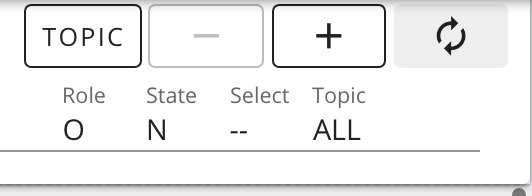
Clause Topic is a very powerful feature that facilitates the side-by-side comparison of documents based on legal clause topics. It also faciltates the intelligent navigation of topics throughout a document.
These options allow the user to:
- Select the legal topic for the panel.
- Sync the panel with other panels through the topic sync capability.
- Increase and decrease the selectivity of the legal topic view to adjust the inclusiveness of the intelligent filter on the legal topic.
- Displays for the topic and Selectivity
TIP
Starting in Docgility version 4.1.1, Docgility also processes sentence-level classifications. When sentences are detected to deviate substantially from the main topic for the paragraph, the clause classification for that sentence is highlighted when drilling down in those topics. The sentence will then be highlighted when the topic is selected. These underlined sentences indicate to the user to pay special attention to this sentence as it may contain embedded topics that are related to the selected topic. Keep in mind that these sentences are only visible when drilling down by topic sensitivity.
# Document Infobar
The document information provides information related to the document loaded in the panel.

Above, you will see a typical document info for a non-custom doctype document.

For documents of a specific document type and group, that information will also be displayed in the document information.
# Paragraph Navigation
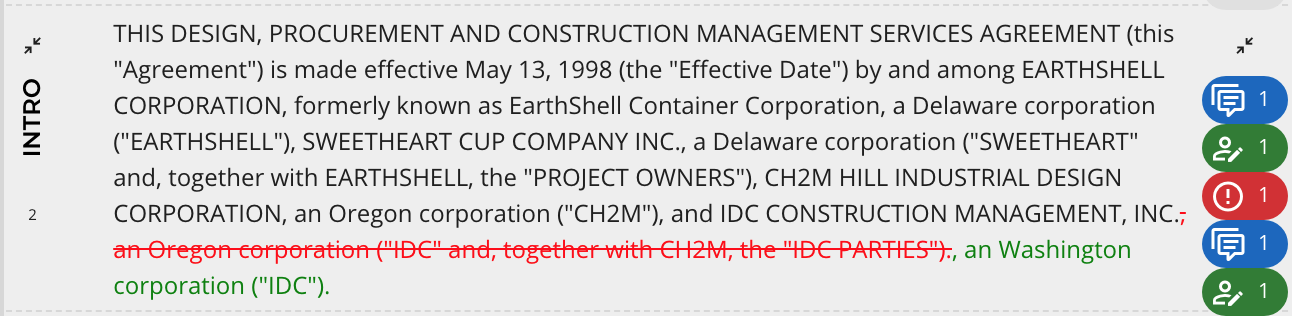
Inside each panel, there is a scrollable text boxes that each contain indicators for each paragraph. As an example, here is a representative paragrah with each of the elements highlighted.
# Adding Comments
User can add comments for collaboration (visible to owners and collaborators) or for negotiation (visible to negotiators as well).
# Adding Docedits
User can add suggestions for docedits for collaboration (visible to owners and collaborators) or for negotiation (visible to negotiators as well). Docedits still need to be approved by owners in order for it to incorporated into the document.
# Adding Clause Labels and Risk
Users can label certain sentences in paragraphs with labels and risk levels.
# Other topics
# Application Security
Docgility is designed to ensure that security is enforced closely for each contract document managed within Docgility. Docgility uses the latest in security technology as well as records each users interaction with documents.
# Document Logs
Docgility further enhances security by recording in the document log when documents are accessed by users. In this way, users are tracked when they view and collaborate on documents.
# Glossary of Terms
Docgility uses a set of standard terms to describe how Docgility operates. This provides a further explanation of each term.
# Frequently Asked Questions
For the most commonly asked questions, the FAQ provides a list of answers. Feel free to send any other questions to help@docgility.com for further answers.